

TheNetTea
  • Trending Now
  • Creator Hub
    • IG Models & Influencers
    • Streamer Central
    • TikTok Stars
  • Net Vibe
    • Must-Watch
    • Screen Life
    • Viral Style
    • Lists & Quizzes
  • The Tea Room
    • Scandals & Exposés
    • Relationship Tea
    • Clapbacks & Feuds
No Result
View All Result
  • Trending Now
  • Creator Hub
    • IG Models & Influencers
    • Streamer Central
    • TikTok Stars
  • Net Vibe
    • Must-Watch
    • Screen Life
    • Viral Style
    • Lists & Quizzes
  • The Tea Room
    • Scandals & Exposés
    • Relationship Tea
    • Clapbacks & Feuds
No Result
View All Result
TheNetTea
No Result
View All Result
Home Net Vibe

Guide to Finding the “Culprit” Slowing Down Your Internet Bandwidth

If your internet is suddenly slow, you need to check it right away.

January 24, 2020
in Net Vibe
0
0
SHARES
6
VIEWS
Share on FacebookShare on Twitter

When you’re downloading a few movies or games and the speed is too slow, it could be due to a program using too much internet bandwidth. In this article, I will guide you on how to check which programs are using the most internet bandwidth so you can “resolve” them.

Using Task Manager

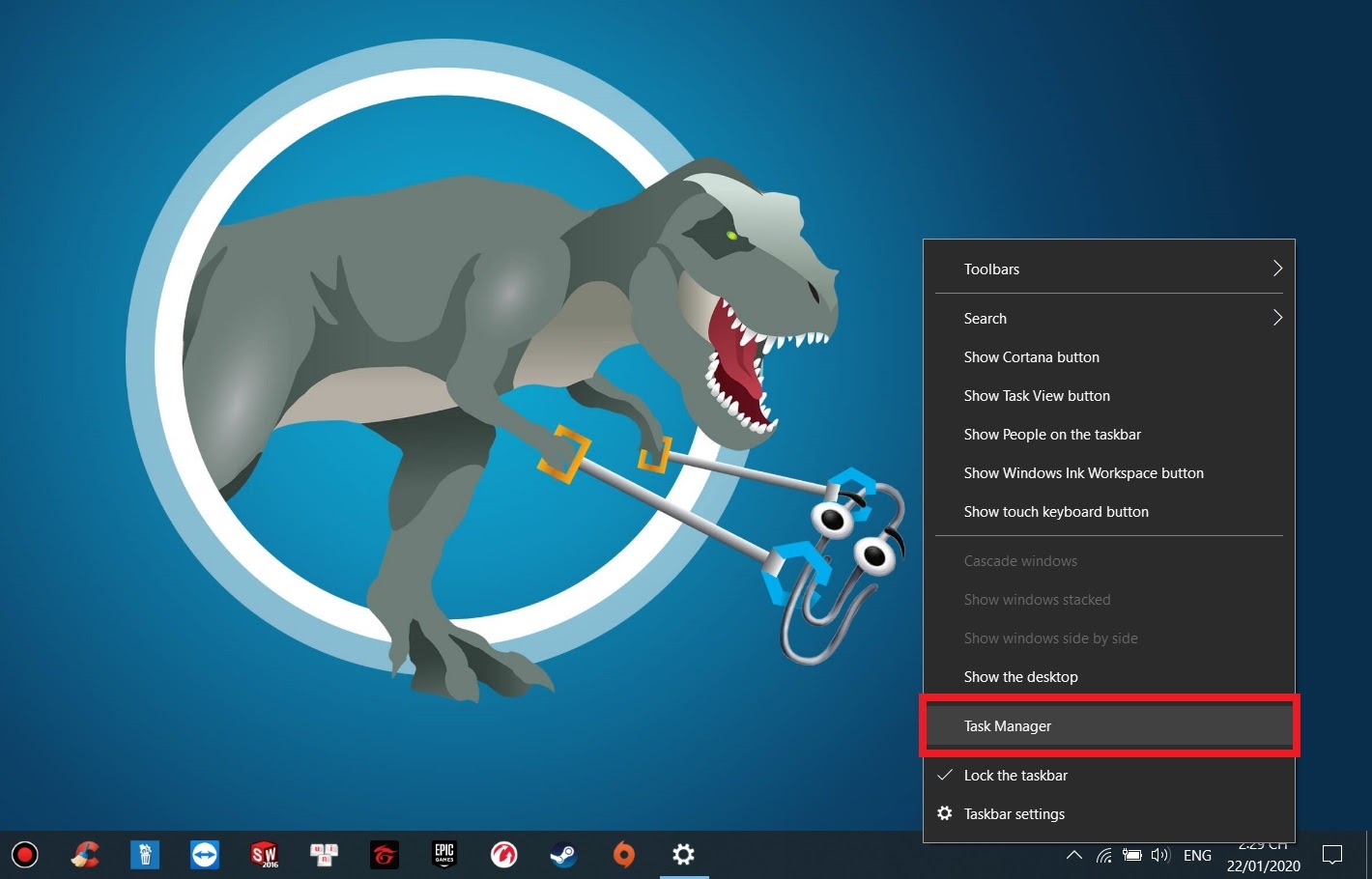
First, right-click on the taskbar and select to open Task Manager.
15798370532991622694016

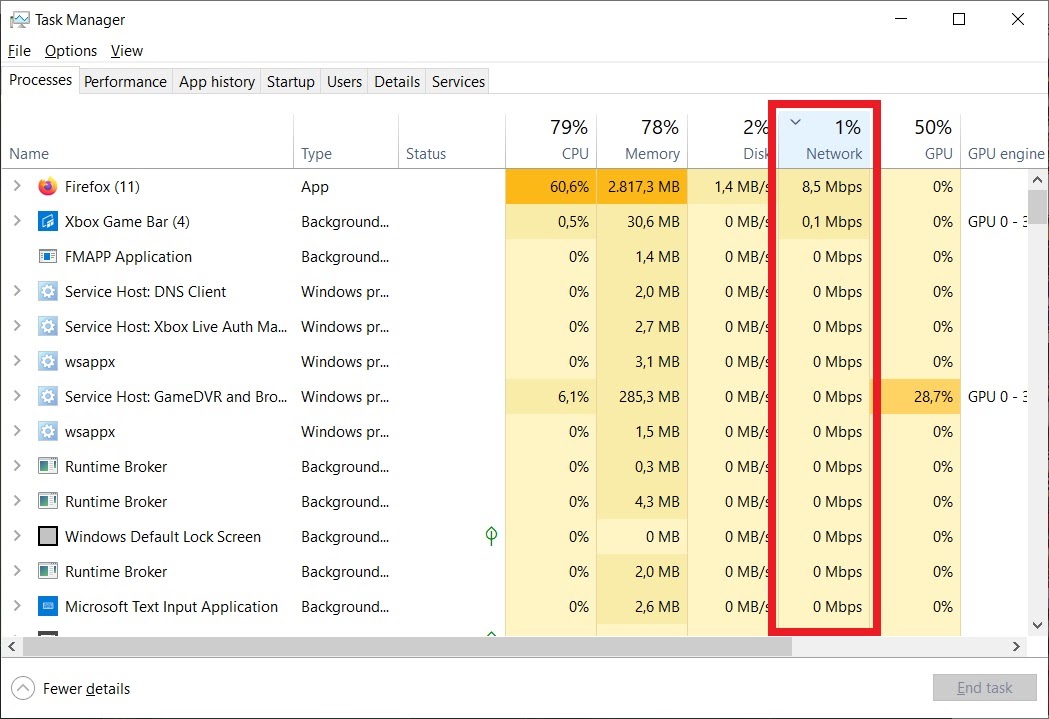
Next, in the Processes tab, click on the top of the Network column to have Windows sort the programs that are using the most bandwidth.
1579837055210356341891

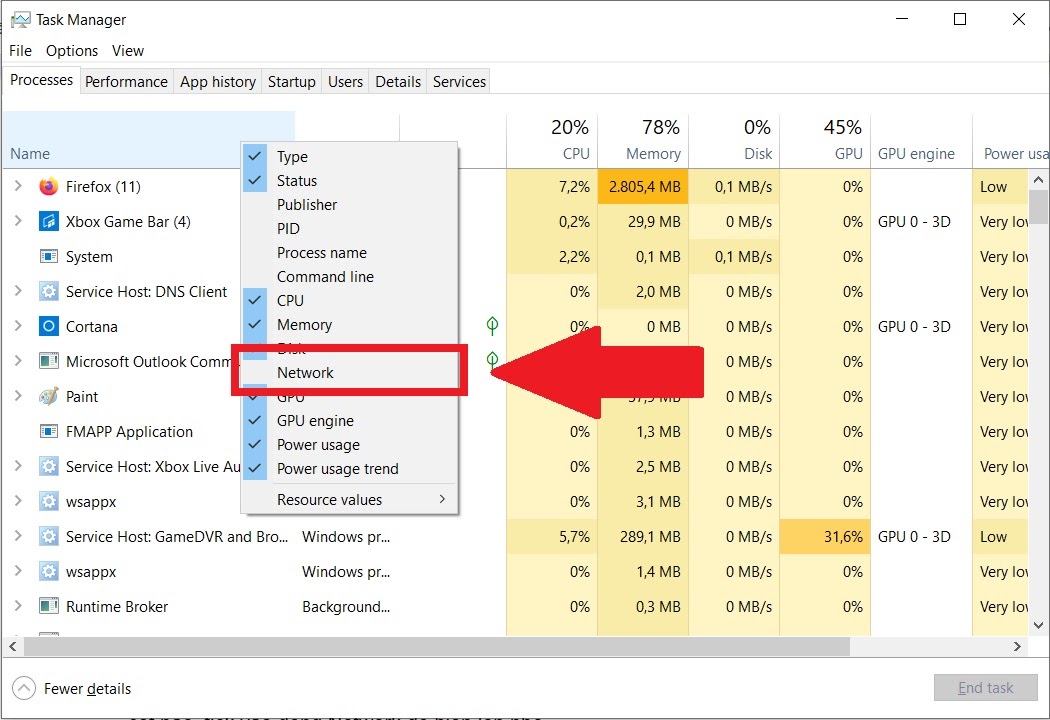
If your Task Manager does not display the Network column, right-click on any column header and check the Network option to display it.
1579837057770499295571

Using Resource Monitor

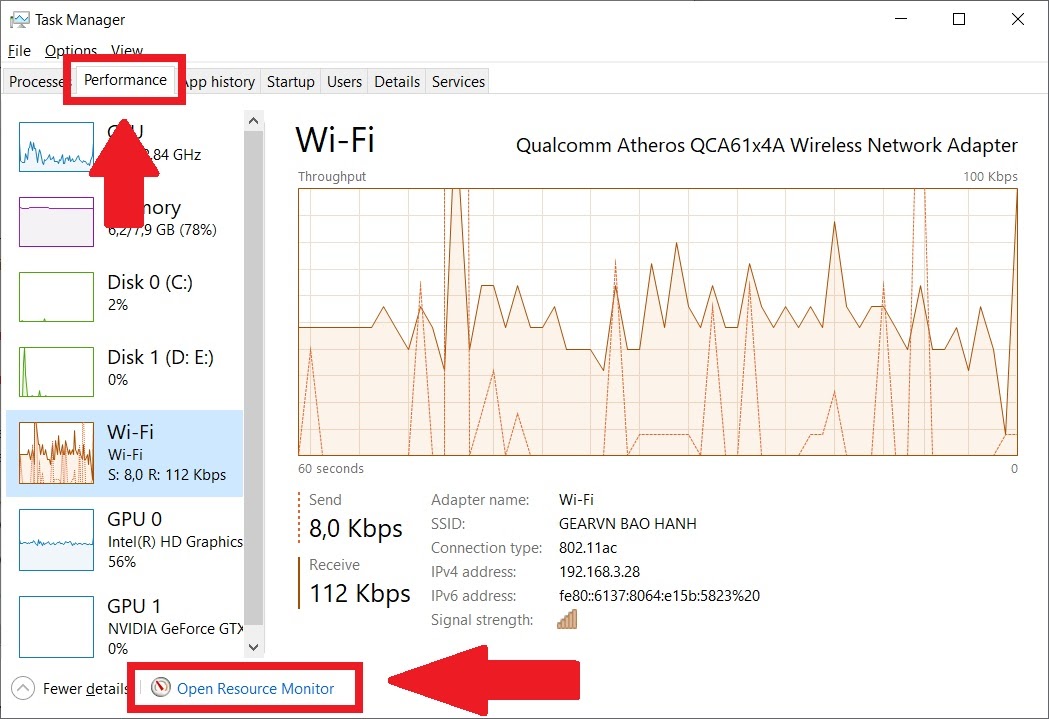
Basically, the Network tab only shows programs that are using a large amount of bandwidth measured in Mbps. If you want to see more detailed information, you can switch to the Performance tab and select Open Resource Monitor below.
1579837057210977010399

Next, select the Network tab for detailed statistics. In this tab, bandwidth will be measured in B/sec (Bytes/second) so you can see exactly how much bandwidth each application is using.
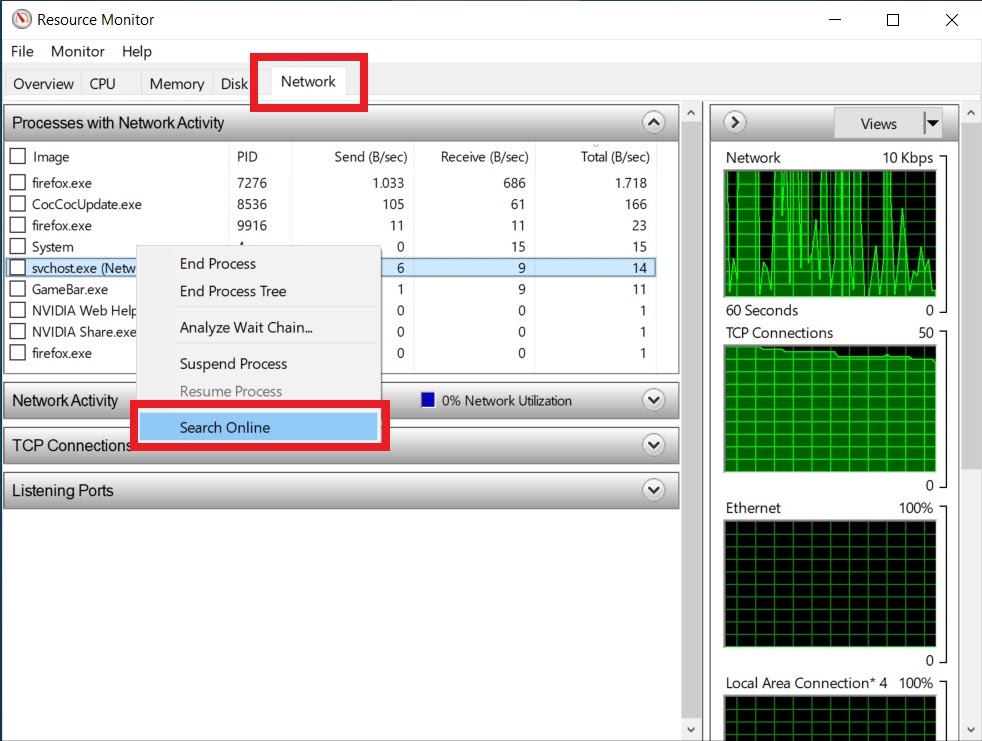
157983705678036500671

If you suspect an unfamiliar program is running on your machine and consuming bandwidth, you can right-click on it and select search online. Since the results will often be in English, you’ll need a bit of vocabulary or a dictionary to help you out.

Check the data usage of programs over the last 30 days

Additionally, Windows 10 will log how much data programs have used over the last month. You can check this by opening Settings → Network & Internet.
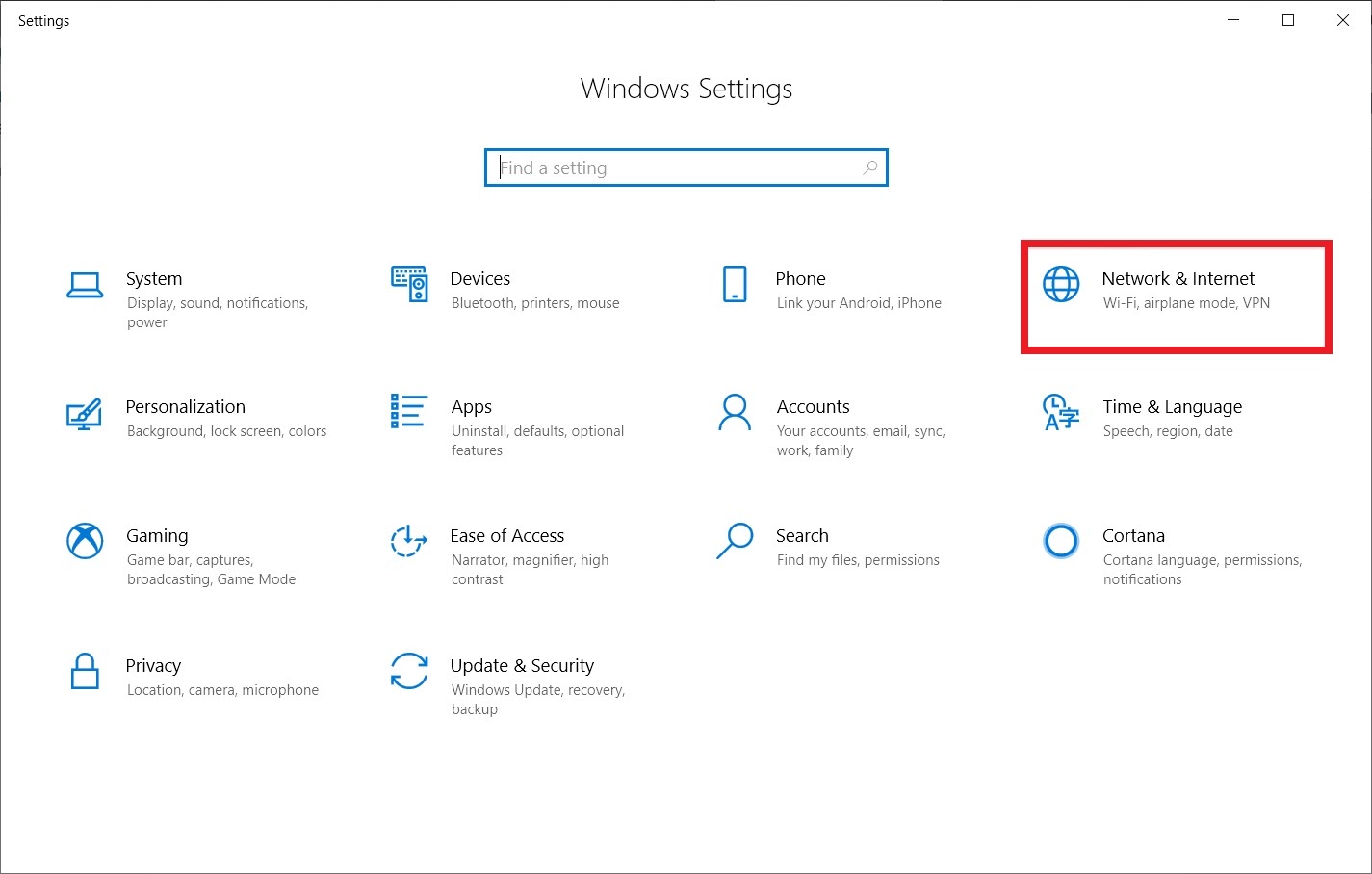
15798370557531099127321

Next, select Data Usage and click on View usage per app.
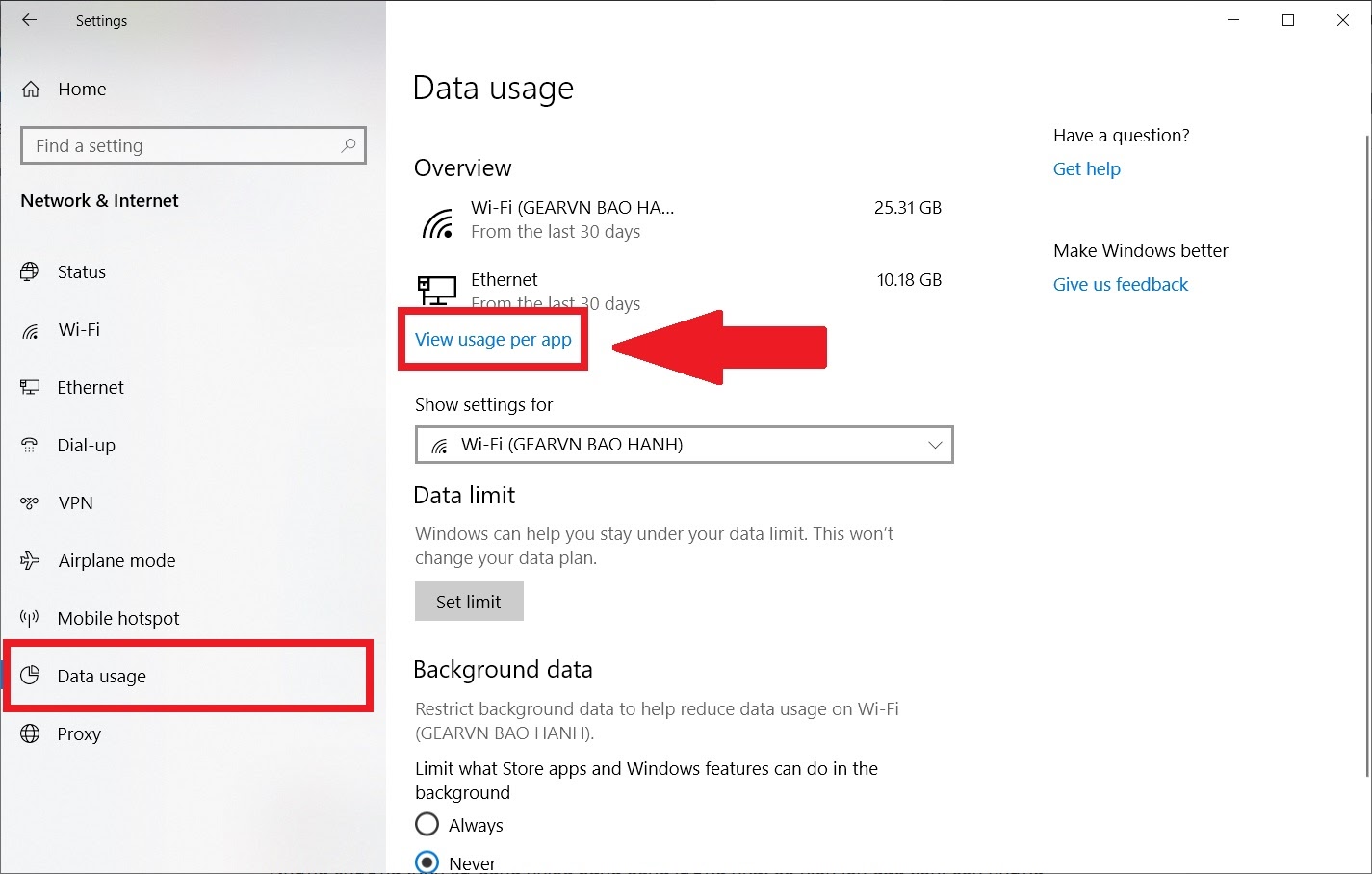
1579837056205829398902

The programs that use the most bandwidth will appear at the top, while those that use less will be listed below. You can use this information to identify the “culprit” slowing down your machine’s bandwidth.
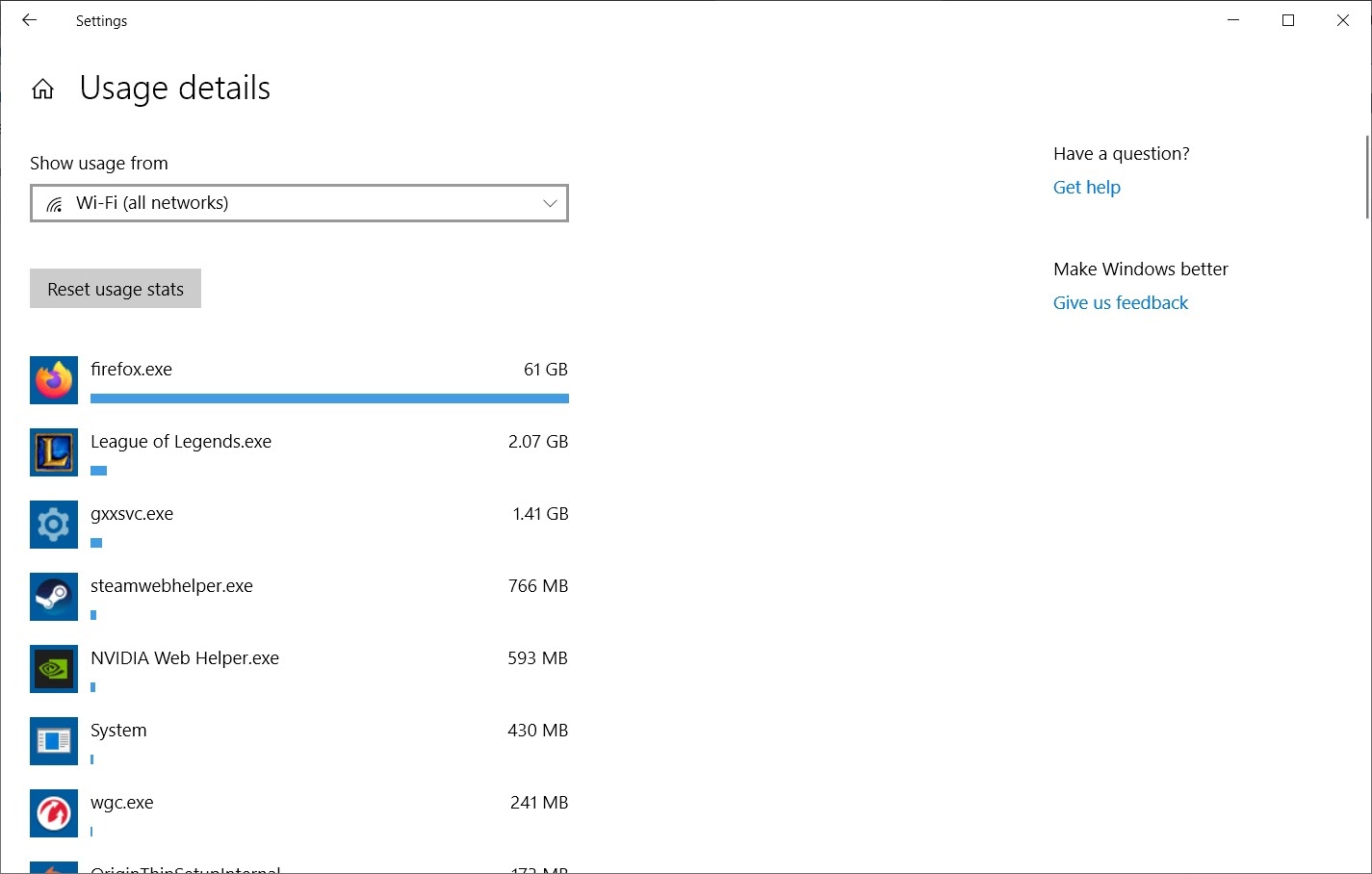
15798370552591421082083

Good luck!

Source: How To Geek, Gearvn


Tags: fixgaming newsinternetonline communityslow

Related Posts

Viral Style

Hospitalized for Exhaustion, the Next Day the Famous Coser Still Attends an Event to Meet Deadlines

Viral Style

Cheering for Basketball, Hot Girl Becomes Unexpectedly Famous Thanks to a Moment, Faces Trouble Right After

Viral Style

The Sensational Leading Lady in Interactive Games, This Hot Girl Is Making Waves and Gaining Millions of Followers

Next Post

Why Does Time Feel Like It's Flying By, and Why Is Tet Losing Its Color?

Photoshopped Image 'Mocking' BTS, Đen Vâu Hastily Responds, Acknowledging BTS Fans Are Too 'Strong'

PUBG: The New Map Karakin Is Bloodthirsty and So Poor That Looting the Whole Map Isn't Enough for Armor

Leave a Reply Cancel reply

Your email address will not be published. Required fields are marked *

Categories

  • Clapbacks & Feuds
  • Creator Hub
  • IG Models & Influencers
  • Lists & Quizzes
  • Must-Watch
  • Net Vibe
  • Relationship Tea
  • Scandals & Exposés
  • Screen Life
  • Streamer Central
  • The Tea Room
  • TikTok Stars
  • Trending Now
  • Uncategorized
  • Viral Style

Topics

beautiful girls gamers gaming news hot girl internet community Netizens online community social media Streamer YouTuber

Recent News

  • Hospitalized for Exhaustion, the Next Day the Famous Coser Still Attends an Event to Meet Deadlines
  • Mai Linh Zuto’s Stunning Poses Leave Gamers Speechless
  • A Series of Beauties in Single’s Inferno Exposed: All Are Pageant-Level Beauties, Who’s ‘Ordinary’ Here?

Category

  • Clapbacks & Feuds
  • Creator Hub
  • IG Models & Influencers
  • Lists & Quizzes
  • Must-Watch
  • Net Vibe
  • Relationship Tea
  • Scandals & Exposés
  • Screen Life
  • Streamer Central
  • The Tea Room
  • TikTok Stars
  • Trending Now
  • Uncategorized
  • Viral Style

Tags

beautiful girls gamers gaming news hot girl internet community Netizens online community social media Streamer YouTuber
  • About
  • Advertise
  • Careers
  • Contact

© 2025 TheNetTea. Spilling the Internet’s Hottest Tea.

No Result
View All Result
  • Home
  • Scandals & Exposés
  • IG Models & Influencers
  • Trending Now
  • Creator Hub
  • TikTok Stars
  • Clapbacks & Feuds
  • Streamer Central
  • Relationship Tea
  • The Tea Room

© 2025 TheNetTea. Spilling the Internet’s Hottest Tea.