

TheNetTea
  • Trending Now
  • Creator Hub
    • IG Models & Influencers
    • Streamer Central
    • TikTok Stars
  • Net Vibe
    • Must-Watch
    • Screen Life
    • Viral Style
    • Lists & Quizzes
  • The Tea Room
    • Scandals & Exposés
    • Relationship Tea
    • Clapbacks & Feuds
No Result
View All Result
  • Trending Now
  • Creator Hub
    • IG Models & Influencers
    • Streamer Central
    • TikTok Stars
  • Net Vibe
    • Must-Watch
    • Screen Life
    • Viral Style
    • Lists & Quizzes
  • The Tea Room
    • Scandals & Exposés
    • Relationship Tea
    • Clapbacks & Feuds
No Result
View All Result
TheNetTea
No Result
View All Result
Home Trending Now

What to Do When Your iPhone Shows ‘Charging On Hold’ Warning?

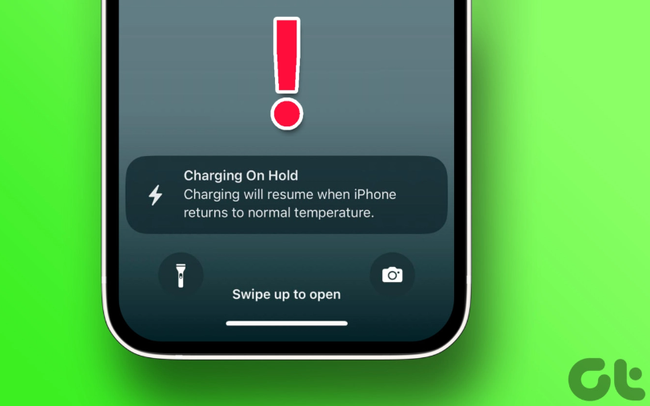
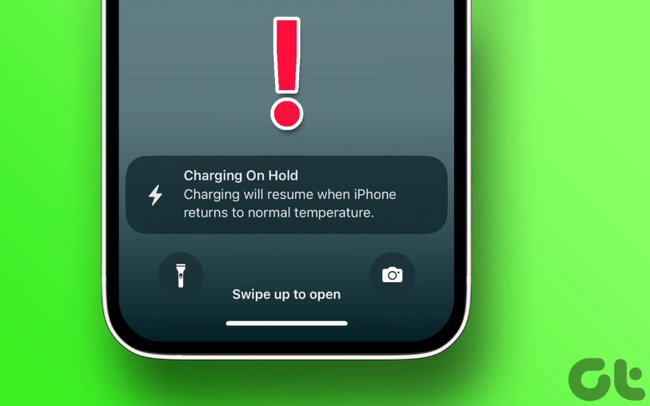
If your iPhone is charging but you see a message saying "Charging On Hold", you might be wondering what caused it and what you need to do.

October 17, 2022
in Trending Now
0
0
SHARES
14
VIEWS
Share on FacebookShare on Twitter
photo 1666005920749 16660059208171573503610


sac1161022 1665928964465853678934 crop 16659290254051386169551 1666005921962 16660059220411027809363

Generally, extremely high temperatures are harmful to electronic devices. This is especially true when they are charging because that process generates heat. If your iPhone, more specifically its battery, gets too hot, bad things can happen. These may include swelling or internal damage to the battery. This can reduce the lifespan and longevity of the battery.

With iOS 16, Apple introduced a system that pauses iPhone charging if the device gets too hot. This way, the operating system can attempt to maintain safe charging for the health of the battery and your safety. When this process starts, iOS 16 informs you that it is pausing charging until the temperature returns to normal.

You will see this most often when driving. Many of us plug our iPhones into the car to use CarPlay and place our devices on the dashboard. This means your iPhone is near the windshield, sitting in direct sunlight, or maybe you just plugged it in and it’s resting in a particularly hot part of the car.

sac161022 1665928653238998439001 1666005913772 16660059140412141087849

What to Do When You See the “Charging On Hold” Warning

Basically, you just need to let the temperature of your iPhone cool down to a safe level. Apple recommends keeping the ambient temperature around your iPhone between 16ºC and 22ºC.

Of course, this takes time, but there are some ways to reduce the time you have to wait to charge again.

The first thing you should do is safely pull over if you are driving. Remove your iPhone from direct sunlight. You may also want to take your device out of its case as that will help the device cool down faster.

If you want to speed up the cooling process even further, here are a few things you can do. However, please note that many of these will prevent you from using your iPhone for navigation or listening to music.

iphone4150221 16659288663351993920919 1666005915424 166600591549799147863

– Lower the screen brightness or use Auto-Brightness in the Accessibility settings

– Enable Low Power Mode

– Turn on Airplane Mode

– Turn off your iPhone for 10 to 15 minutes

Along with any of these, you should keep your phone out of direct sunlight. Another step you can take is to stop any apps that are using mobile data.

Tags: AppleiOSiPhonephonessocial media

Related Posts

Trending Now

The Most Sensual Game Surprises Fans with Impressive Female Character Images, Teasing a Sequel

Trending Now

The “National Best Friends” Duo of Japanese Actors Form a Music Group and “Debut” with a New MV

Trending Now

The Launch of a Scorching Hot Female Character: Game Full of Beauties Unexpectedly Sparks Controversy

Next Post

How to Remove Personal Information from Google Search Results

This is the only country in the world that bans the sale of the iPhone 14

Comparing Two Mobile Gaming Devices from Razer and Logitech: Which One Will Players Choose at This Price?

Leave a Reply Cancel reply

Your email address will not be published. Required fields are marked *

Categories

  • Clapbacks & Feuds
  • Creator Hub
  • IG Models & Influencers
  • Lists & Quizzes
  • Must-Watch
  • Net Vibe
  • Relationship Tea
  • Scandals & Exposés
  • Screen Life
  • Streamer Central
  • The Tea Room
  • TikTok Stars
  • Trending Now
  • Uncategorized
  • Viral Style

Topics

beautiful girls gamers gaming news hot girl internet community Netizens online community social media Streamer YouTuber

Recent News

  • Hospitalized for Exhaustion, the Next Day the Famous Coser Still Attends an Event to Meet Deadlines
  • Mai Linh Zuto’s Stunning Poses Leave Gamers Speechless
  • A Series of Beauties in Single’s Inferno Exposed: All Are Pageant-Level Beauties, Who’s ‘Ordinary’ Here?

Category

  • Clapbacks & Feuds
  • Creator Hub
  • IG Models & Influencers
  • Lists & Quizzes
  • Must-Watch
  • Net Vibe
  • Relationship Tea
  • Scandals & Exposés
  • Screen Life
  • Streamer Central
  • The Tea Room
  • TikTok Stars
  • Trending Now
  • Uncategorized
  • Viral Style

Tags

beautiful girls gamers gaming news hot girl internet community Netizens online community social media Streamer YouTuber
  • About
  • Advertise
  • Careers
  • Contact

© 2025 TheNetTea. Spilling the Internet’s Hottest Tea.

No Result
View All Result
  • Home
  • Scandals & Exposés
  • IG Models & Influencers
  • Trending Now
  • Creator Hub
  • TikTok Stars
  • Clapbacks & Feuds
  • Streamer Central
  • Relationship Tea
  • The Tea Room

© 2025 TheNetTea. Spilling the Internet’s Hottest Tea.