

TheNetTea
  • Trending Now
  • Creator Hub
    • IG Models & Influencers
    • Streamer Central
    • TikTok Stars
  • Net Vibe
    • Must-Watch
    • Screen Life
    • Viral Style
    • Lists & Quizzes
  • The Tea Room
    • Scandals & Exposés
    • Relationship Tea
    • Clapbacks & Feuds
No Result
View All Result
  • Trending Now
  • Creator Hub
    • IG Models & Influencers
    • Streamer Central
    • TikTok Stars
  • Net Vibe
    • Must-Watch
    • Screen Life
    • Viral Style
    • Lists & Quizzes
  • The Tea Room
    • Scandals & Exposés
    • Relationship Tea
    • Clapbacks & Feuds
No Result
View All Result
TheNetTea
No Result
View All Result
Home Trending Now

Tips to Make Your SSD Boot Windows 10 Seconds Faster

When you press the power button to turn on your computer, Windows waits about 10 seconds before launching startup applications.

May 11, 2020
in Trending Now
0
0
SHARES
1
VIEWS
Share on FacebookShare on Twitter

This 10-second “delay” in the boot process is to give the operating system and Windows services time to load data into memory and perform necessary system tasks before these applications request resources. However, if you have certain applications that need to open immediately when Windows starts, you can make a small adjustment in the Registry.

Note 1: The method of adjusting in the Registry that I am about to introduce will reduce or disable the boot delay feature. This means it will apply to all applications that start with Windows. You will not be able to set a specific application to skip the boot delay.

Note 2: Skipping the boot delay will work best on SSDs; with HDDs, you may not notice any difference.

Step 1: First, press the key combination Windows + R and type regedit then hit Enter.
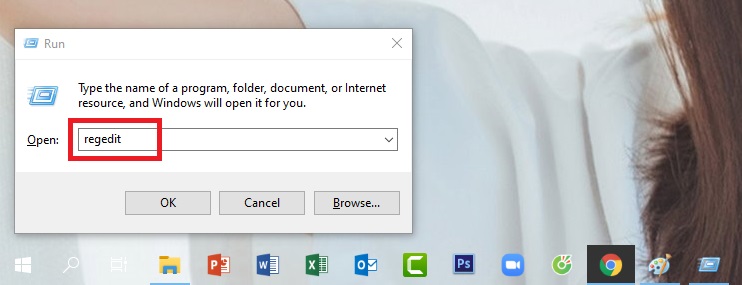
photo 1 15891861662801722235939

Step 2: When the Registry window appears, click in the following order (or copy and paste it into the search bar and hit Enter):

HKEY_LOCAL_MACHINESOFTWAREMicrosoftWindowsCurrentVersionExplorer

Step 3: Right-click on the Explorer entry, select New, then select Key.
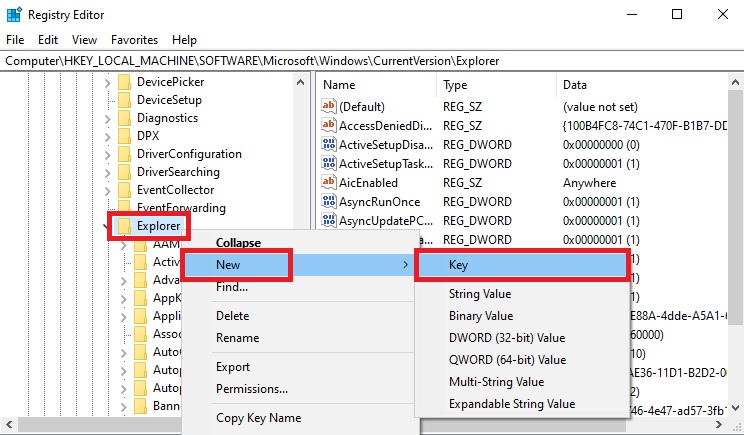
photo 1 1589186168927542273122

Step 4: Name the new Key you created Serialize.
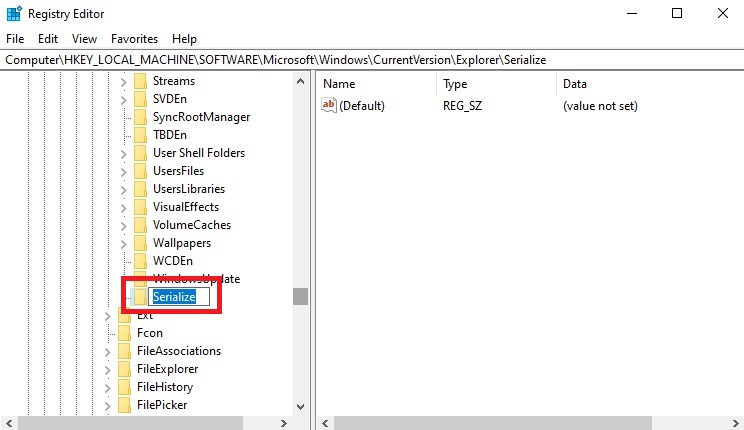
photo 2 15891861719887761392

Step 5: Right-click on the Serialize entry, select New, then choose DWORD (32-bit) Value.
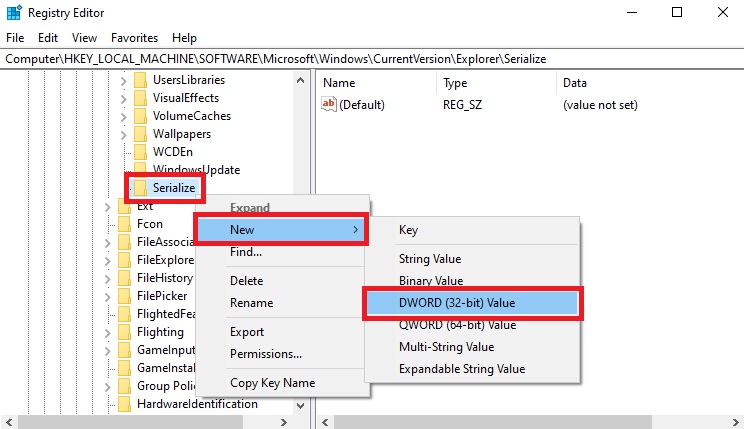
photo 3 1589186169458656620497

Step 6: Name the newly created entry StartupDelayInMSec.
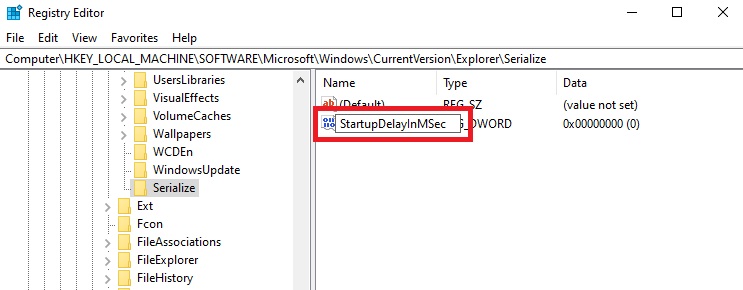
photo 4 15891861714521469209960

Step 7: Then, open the StartupDelayInMSec entry and ensure the Value data is set to 0. After that, exit Registry and restart your computer to save the settings.
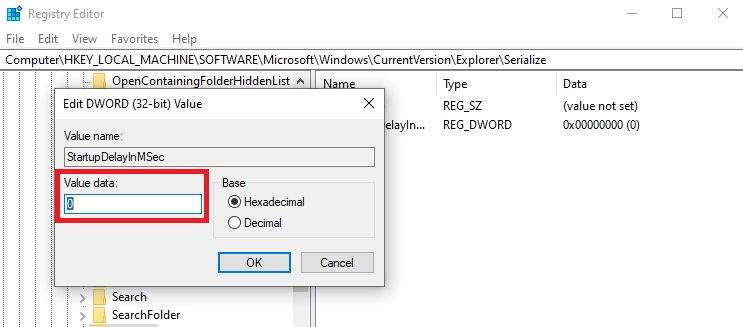
photo 5 15891861704571385919302

If you want to re-enable this feature, you can simply right-click on the StartupDelayInMSec entry and select Delete.
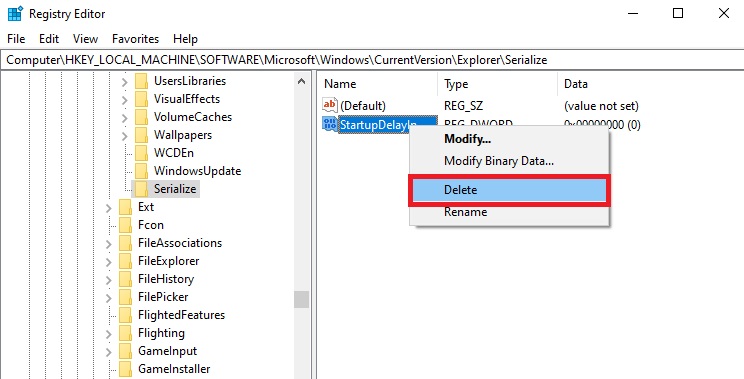
photo 6 1589186169970133963037

So that’s how I guided you to bypass the 10-second delay rule, helping applications to boot faster. Good luck!

According to Gearvn


Tags: bootcomputer tipsgaming newsinternet communitySSDWindows 10

Related Posts

Trending Now

The Most Sensual Game Surprises Fans with Impressive Female Character Images, Teasing a Sequel

Trending Now

The “National Best Friends” Duo of Japanese Actors Form a Music Group and “Debut” with a New MV

Trending Now

The Launch of a Scorching Hot Female Character: Game Full of Beauties Unexpectedly Sparks Controversy

Next Post

Boy Accidentally Discovers Gamer Dad's Secret Stash While Messing with Computer Drive, Leaving the Internet in Stitches

Top 10 Richest Gamers in the World - 'Shroud' Only Ranked 5th

ASUS ROG Zephyrus G15: A Powerful AMD Gaming Laptop at a Reasonable Price

Leave a Reply Cancel reply

Your email address will not be published. Required fields are marked *

Categories

  • Clapbacks & Feuds
  • Creator Hub
  • IG Models & Influencers
  • Lists & Quizzes
  • Must-Watch
  • Net Vibe
  • Relationship Tea
  • Scandals & Exposés
  • Screen Life
  • Streamer Central
  • The Tea Room
  • TikTok Stars
  • Trending Now
  • Uncategorized
  • Viral Style

Topics

beautiful girls gamers gaming news hot girl internet community Netizens online community social media Streamer YouTuber

Recent News

  • Hospitalized for Exhaustion, the Next Day the Famous Coser Still Attends an Event to Meet Deadlines
  • Mai Linh Zuto’s Stunning Poses Leave Gamers Speechless
  • A Series of Beauties in Single’s Inferno Exposed: All Are Pageant-Level Beauties, Who’s ‘Ordinary’ Here?

Category

  • Clapbacks & Feuds
  • Creator Hub
  • IG Models & Influencers
  • Lists & Quizzes
  • Must-Watch
  • Net Vibe
  • Relationship Tea
  • Scandals & Exposés
  • Screen Life
  • Streamer Central
  • The Tea Room
  • TikTok Stars
  • Trending Now
  • Uncategorized
  • Viral Style

Tags

beautiful girls gamers gaming news hot girl internet community Netizens online community social media Streamer YouTuber
  • About
  • Advertise
  • Careers
  • Contact

© 2025 TheNetTea. Spilling the Internet’s Hottest Tea.

No Result
View All Result
  • Home
  • Scandals & Exposés
  • IG Models & Influencers
  • Trending Now
  • Creator Hub
  • TikTok Stars
  • Clapbacks & Feuds
  • Streamer Central
  • Relationship Tea
  • The Tea Room

© 2025 TheNetTea. Spilling the Internet’s Hottest Tea.