


I’m sure many of you here have the same question as I do. If the graphics card is so beautiful, why don’t they design it to face up instead of laying it down to show off its back? Two years ago, I asked this question to a friend who knows more about PCs than I do, and he said: “Just use it as it’s designed. If you have an opinion, go make your own card and use it.”
I was frustrated, but I couldn’t argue back because I didn’t really know anything. But that was a long time ago. Recently, while assembling a test machine with my colleagues, I heard someone mention this question again. After chatting a bit and searching online, we managed to agree on three main reasons as follows.
Traditional Standards – According to a Reddit member
Those who have been playing around with PC hardware since before 2000 might remember the ISA slot, which was the expansion connection standard before the now-popular PCI slot. In the past, graphics cards were attached to this slot, and instead of facing down like the current PCIe graphics cards, they faced up.
Later, PCI was developed and was equipped alongside the ISA slot on many motherboard models. Designers wanted developers to be able to use a maximum of six PCI cards or six ISA cards in a case with six expansion slots. So they came up with a solution: to have the PCI cards face opposite to the ISA cards.
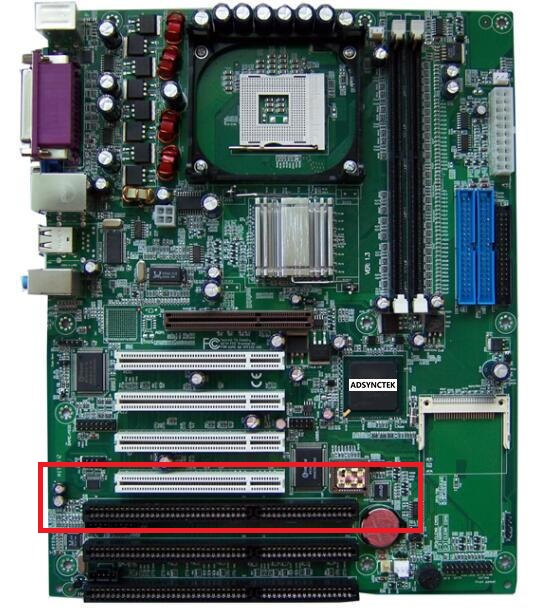
As a result, one ISA slot and one PCI slot are close together and can share the same expansion slot on the case. This design also allowed motherboard manufacturers not to have to sacrifice one slot for the other.
The AGP port later followed the design of PCI, and the PCIe that we see now is based on the AGP design. As a result, graphics cards have been installed upside down to this day.
Component Clearance
Those who buy oversized coolers and find them bumping against RAM will definitely understand this best. High-performance graphics cards, especially gaming cards, generate a lot of heat, so they often have large cooling systems, making the cards thicker. It’s not uncommon to find a card that is as thick as four expansion slots.

Think about it, four slots starting from the first PCIe x16 port would be quite close to the CPU. Even if it doesn’t reach the CPU, it will still bump into the RAM, the cooler… Because the PCIe graphics card is installed upside down, we have only heard of coolers bumping into RAM, but never RAM bumping into the card.
Cooling Issues
The graphics card and CPU are the two components that generate the most heat in a PC setup. Most modern graphics cards are equipped with active cooling systems that include fans and heatsinks, and CPU coolers are the same. The performance of a cooling system, aside from its quality, also depends on environmental factors such as temperature, pressure, and airflow direction in the case.
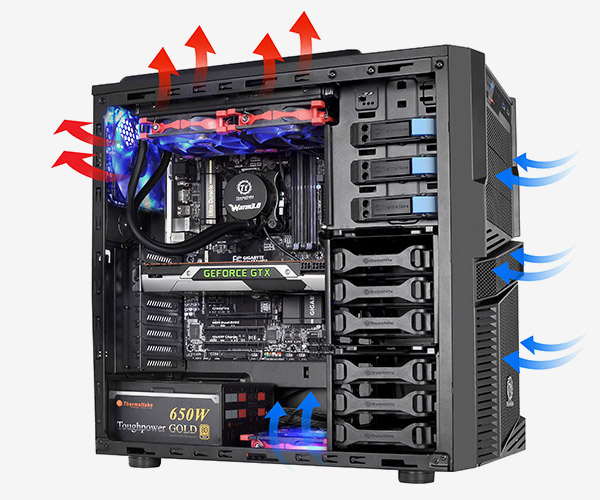
When the card is facing up, the CPU cooler and the graphics card cooler will interfere with each other’s airflow, leading to reduced cooling efficiency. The level of impact may not be much, but it still exists. Meanwhile, the area under the case’s bottom, which typically has cooler air (cooler, denser air tends to sink to the bottom), is not being fully utilized.
When the fans are facing down, everything is easily resolved; both the CPU and GPU have their own cooling airflow, utilizing the airflow in the case without affecting each other’s cooling efficiency.
According to Gearvn