


Here are the 10 most classic stupid pranks of PC gamers. If you think I missed any, feel free to let me know to add it!
Flipping the Power Supply Voltage Switch
One of the most classic stupid pranks among PC gamers definitely has to be this one. Its purpose is to allow the power supply unit to be compatible with various domestic power grids. For example, in Vietnam, it’s 220V, while in the USA, it’s 120V. A power supply with a voltage switch that can toggle between these two voltage levels can be sold in both Vietnam and the USA, that’s how it works. In whichever power grid you use the appropriate voltage, everything will be fine. But if you tamper with it, you’ll definitely see some smoke.
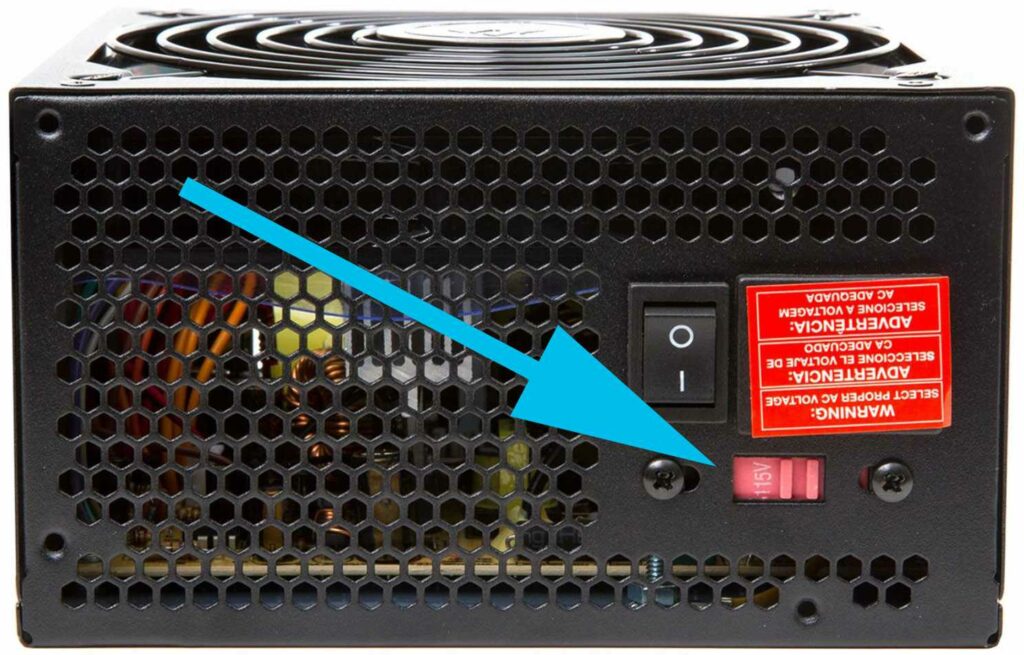
I remember back in 7th grade, I once had a super classic stupid moment when I flipped this switch while the machine was running. It exploded with a huge bang and immediately after, a cloud of white smoke rose, along with my power supply and motherboard. So remember, if you don’t know what you’re doing, don’t touch this switch.
Touching the Intel Socket Pins
It sounds rare, but it actually happens (like it did for me). Almost every newbie PC gamer does this, buying a bunch of components (especially new ones) just to touch and sniff them before assembling the machine. But whatever you touch, stay away from that socket pin area on the Intel motherboard.

I fell into this trap before; I bought an Asus ROG STRIX B360-H GAMING, which could be considered top tier in the B360 lineup. At that time, I didn’t understand the intricacies of life, and I thought the socket pins looked fun, so I touched them. As a result, in a moment of carelessness, I bent about ten pins. The next half hour was one of the most stressful times of my life as I tried to straighten them out. Luckily, it didn’t leave any lasting “effects,” but the “aftershocks” from that incident are still vividly etched in my little heart.
For those who clean their machines, I also advise against touching these socket pins; if you want to dust them off, leave the CPU on it and dust it, don’t use compressed air, brushes, or anything on these socket pins, or you will regret not listening to me.
Unplugging the Front Panel Wires and Not Knowing How to Reconnect
Plugging in the front panel wires is one of the biggest nightmares for those just starting to build PCs. I find it quite amusing how many people totally lose track of things. When cleaning the machine, they unplug everything, and when it comes time to reconnect, they just stare at the mess of wires, not knowing where to plug them back in. So, they have to haul the whole case to a shop to have someone plug it back in.
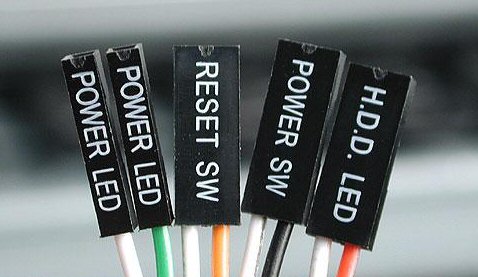
My advice here is, if you don’t know how to plug this wire back in, just use tape to stick the ends of the wires together, unplug the whole bundle, and then plug it back in as a whole to make it easier. Back when I didn’t know how to plug it in, I used this method all the time and it always worked.
Removing AMD Coolers Without Rotating
This one is well-known among red team gamers; the blue team has its struggles, and so does the red team. Because AMD CPUs are not securely locked into the motherboard like Intel CPUs, sometimes when you remove the cooler, you end up pulling the CPU out with it. While this situation usually doesn’t damage the components, anyone who sees this will definitely feel a pang of fear.

My advice for those using red team CPUs is, before removing the cooler, gently rotate it a little bit. Rotate to the right and then to the left, and keep turning until the cooler loosens enough to be easily separated from the CPU before lifting it off. Do it carefully.
Removing the HDD
Don’t remove the HDD, folks. Once you take it out, you should also prepare to throw it in the trash. Just a single dust particle, a fingerprint, a cat hair… is enough to ruin it. Even tightening the screws with the incorrect torque can cause issues. We’ve written an article about this topic, so if you’re interested, feel free to check the link below!
The advice is to never remove the HDD unless you want to take out the motor, magnetic disks, or magnets for fun.
Using Toothpaste Instead of Thermal Paste
I don’t know when it started, but some people online began spreading the myth that toothpaste can be used as thermal paste. Basically, this trick does work; it increases the contact efficiency between the heatsink and the CPU’s IHS. But the problem is, it only works for a very short time. Once the water evaporates, the dried toothpaste will hinder heat transfer and cause the CPU to get very hot.

This is mostly just a silly experiment; it doesn’t have much practical effectiveness. Although it’s very popular and doesn’t cause too much harm, in essence, this is still a form of stupid play.
Washing Components Like Dishes
The biggest enemy of electronic components is water and stupid play; here, we have both. Water doesn’t directly kill electronic devices; devices that fall into water are not necessarily damaged. It’s only when there is water and electricity in electronic devices that it causes a short circuit, resulting in damage. In theory, you can wash components like you wash dishes, dry them, and then use them again, looking clean and new.
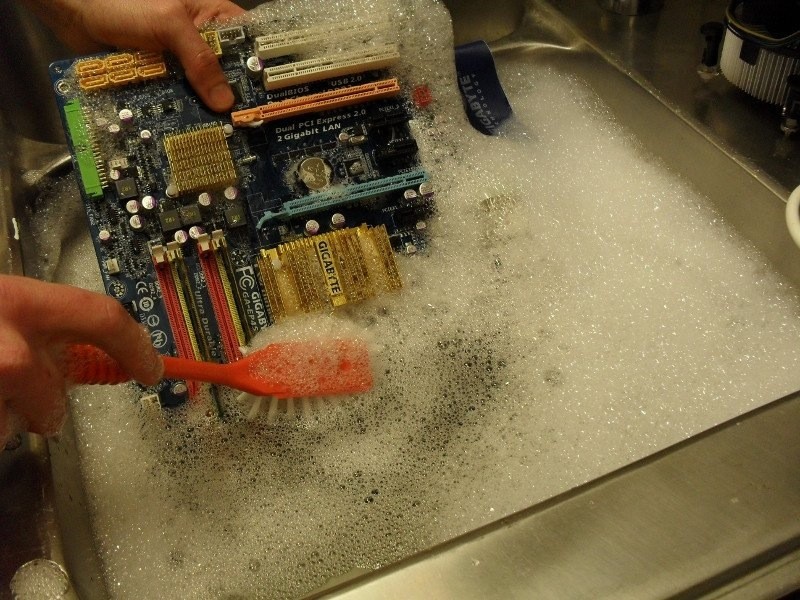
But the problem is, no one can guarantee that water won’t remain trapped in chips, circuits, capacitors, and PCB layers… And as soon as there’s water and you plug it in, you’ll definitely smell something burning. Although many people have successfully done this, you shouldn’t try it. Essentially, this is more of a fun challenge than a computer cleaning tip. Don’t try it if you still value your PC setup.
Removing the Graphics Card While Still Under Warranty
Some people have a strange habit of poking screws into warranty seals. A graphics card, once it leaves the factory, is designed for you to use it throughout the warranty period without needing to touch it. Many people, when cleaning their machines or replacing thermal paste for the CPU, also remove the graphics card to replace the paste, but to do so, they have to break the warranty seal that is attached to one of the four screws around the CPU chip.

If it runs well until the end of the warranty, then it’s fine, but if it’s still under warranty and you remove it, the manufacturer has the right to refuse warranty service in case of issues. At that point, you can only take it to a third-party repair service, sell it as parts, or keep it as a memento.
Buying High-Quality Components for Super Cheap
The saying “you get what you pay for” is almost never wrong, and it holds even truer in this case. Many people have fallen for the trap, seeing a price drop and diving right in without thinking. The result is paying for some expensive lessons.

I don’t know what else to say here; I’m not a guru and can’t predict what you might encounter out there, so I can’t guide you in every situation. I can only say that if you see an unusually low price, you need to ask questions—not just about PC components but about everything else too. If a market sells something for 10 units, and someone sells it for 9, there might be a legitimate reason, but if it’s 5 units, then 99% of the time, it’s a scam. You can’t even see the electronics up close, let alone when buying online. It’s best for beginners to buy new items from reputable dealers, no need to think too much. As for hunting for cheap second-hand items, wait until you have a bit more experience before trying.
Buying Coolers Without Considering the Case
I see many people fall into this trap. Many air cooler models today are quite large, such as the AORUS ATC800 from Gigabyte or the NH-D15 from Noctua… If you plan to buy big coolers like these, make sure to check whether your case can accommodate them. Sometimes you buy one, and it doesn’t fit, leaving you with the hassle of selling either the case or the cooler.

Those buying AIO coolers should also check the case’s support for radiator dimensions and thickness when purchasing. If you buy it and can’t install it, it can lead to a lot of trouble.